

2014: The Year the Internet Jumped the Shark
Tue 16 December 2014
Michael Labbe
#rant
I have been on the Internet for 19 years, and on BBSes for four more before that. This is the first year where I have found myself reflecting on trends and deciding that the Internet is poised to lead its users towards permanent entrenchment in negative experiences and outcomes. The Internet has jumped the shark. It can un-jump, but it won’t in 2015. That’s my prediction, and here’s what you can do about it for yourself.
Let’s assume, for starters, that you are using the Internet to enrich your life in some way: you are here because you want to learn something, meet someone, or make something and share or sell it to people. Sure, there are always cat pictures and all of that cheap entertainment, but that’s not what I’m talking about. I’m assuming you are interested in getting something valuable out of your time using the Internet.
The most disturbing trend we’ve seen on the Internet in 2014 is an uptick in the severity and frequency of harassment of minorities. Gamergate and its response are both bolstered by Twitter, a web service that acts as a leaderboard for mobs: retweets, follower counts, replies and favourites are tracked. Ideas that need more than 140 characters to express are scattered. This damages discourse. You could not ask for an architecture that enhances mob mentality over rational discourse any more than what Twitter provides.
Public places will never be safe places on the Internet. While that is no justification for harassment, complete safety cannot be a technical or customer service solution. If anyone can join and re-join, it is not possible to achieve complete safety. This is history repeating itself as anyone who spent time on IRC or on bulletin boards will attest. Unfortunately, this time the business models of the companies hosting these services depend on growth which can only be achieved through openness. It would appear from the actions of social companies that they believe closed communities do not scale VC-funded businesses or publicly traded companies.
Next up, we have the problem of overdependence on “the cloud” for consumers. Because many companies are primarily offering cloud-based solutions for your data, it has normalized the idea of cloud solutions for many people.
The consumer cloud is, in many cases, a tax on complacency — in some cases, quite literally a fee and in others, a sacrifice of privacy and control over your personal data. It costs more than the price of a 2TB hard drive — which could store many collections ten times over — for the permission to stream your music from Spotify for a single year. Once you’ve paid Adobe $120 a year to store your photos, that’s it — they have you on a plan because they have your photos. All of these services can be replaced by a couple of hard drives and a Synology product. Then you have complete privacy, and you are not at the whim of a huge company whose interests are at cross purposes with yours, at best.
If you told a photographer in 1990 that many of her peers would consider paying a company a yearly fee to hold her own photos in the future, she would look at you very oddly. How dystopic.
The last problem I want to address isn’t particularly new to 2014, but it isn’t getting any better, either. We get our information from social feeds now. Google famously ended Google Reader, asking us to get our news from Google+ instead. Sadly, people don’t use Facebook and Google+ to pass around truly useful information. Nine times out of ten, you get articles that amount to fodder for small talk and dinner conversations. This seriously degrades the utility of what you read on a daily basis.
I target these three problems because they are examples of companies routing us towards a less informative, more troubled Internet. They do it because they are operating at a cross purpose to our own: to scale their customer bases. I expect these assaults on meaningful Internet time will continue and increase in 2015.
You can take the Internet back for yourself. I recommend these three things:
-
Create closed communities; defend the ones you have already. If you run a company, take a stand. Create safe places for like-minded people and keep them that way. A chat window (Skype, Tox) with ten productive, smart people who contribute ideas and talk to each other is more rewarding than a stream of social updates running at cross purposes. Curate new friends from your Internet acquaintances.
-
Host your own data and services. If you have tech know-how, it’s satisfying and fun to take this back. It’s about as hard as setting up a router (read: easy) to buy and use a Synology product and Cloud Station. 10TB of Dropbox-like syncing with complete privacy and no monthly costs, anyone? Run a Subsonic server to stream music to your phone and stereo. Host your own photos for fractions of a penny per shot.
-
Fix your information diet. Start by blocking, hiding and un-following. Disable push notifications for almost all of your apps. If you use Gmail, use filters to suppress all unsolicited emails that make it in your inbox. Now that you’ve cleaned up, it’s time to get back to RSS. Use Feedly or similar. Build your list of blogs back up. Start blogging, yourself. Contribute useful information back.
It’s unrealistic to assume that these companies will change their ways. But you can make your time on the Internet that much more enriching and valuable. The great news is that we still have the computing freedom to sidestep these trends.
What I Learned From Sharing Native File Dialogs
Thu 27 November 2014
Michael Labbe
#code
I open sourced Native File Dialog last night. It’s a lean C library that pops up a native file dialog on Linux, Mac and Windows. It seems to have scratched an itch that a lot of people have, as it’s been starred 50 times on Github overnight, and my announcement tweet has received 27 retweets and 52 favorites as of this morning.
I did learn a few things writing and releasing this. Here they are in no particular order.
Linux users are reticent to link against GTK+. Plenty of people don’t want the overhead of GTK+ just to get a few paths back from the user. This makes sense if your app benefits from staying small. In order to get GTK+ up, you have to link against quite a few libraries: Cairo, GLib and GTK+ itself, to name three.
Interestingly, there must be similar overhead in Windows, but it isn’t as visible; most of what you need is given to you through COM object initialization, not linking libraries. Linux has no official toolkit, and as a result, the cost is much more visible to developers.
Of course, you can release COM objects.
GTK+ has no uninitialization. Once you have paid the cost of initializing GTK+, it permanently allocates private memory in your process. This is a shame. At least I can release COM objects.
This has led people to suggest Zenity and pipes; actually launching the file dialog in a separate process! I have always been skeptical of this approach — what happens when the dialog opens in another workspace, or the main app crashes, or X remoting causes other idiosyncrasies?
At any rate, I would be happy to accept an nfd_zenity.c patch which allows people to trade off between these problems.
People Really Like to just add one file to their project. Native File Dialog builds with SCons, which, admittedly, is not something every developer has installed. STB has spoiled people — they really want to just drop a file in to their current build! I am going to provide instructions that help people bypass SCons.
Feedback is hard to come by when you work on a small team. If you open source something useful, devs will scrutinize it and provide feedback. It doesn’t have to be a large piece of code — actually, it’s probably better that it’s not! If NFD did ten things, the issues people raised would have been broader, and the criticisms received may not have been as beneficial to me.
Installing an Air Conditioner in a Window That Barely Opens
Mon 26 May 2014
Michael Labbe
#handy
Around here, air conditioning is almost never part of a deal when you buy or rent an apartment. I converted a spare bedroom into an office, which was great until the sun hit and it turned into a virtual sauna.
In getting an AC unit installed, I was faced with an interesting problem: I had windows that opened up and out at an angle, but just barely. The glass is held in place by metal framing, making it intractable to drill through.
I contacted a few self-described handymen who quoted me anywhere from 50 to 500 dollars and proposed building mounts out of wood, metal, or just plain crazy gluing the AC unit to the frame (!). No two quotes proposed the same solution. That’s when I knew the experience I could hire to solve the problem would be improvising on the job. I had an idea of my own which was cheap and easy to test, so I decided to try it out.
The approach? Industrial strength Velcro® and acrylic glass.
I recently had success mounting rear speakers on stands with Velcro. This isn’t the stuff you kept your shoes on with in second grade. Industrial strength Velcro is at least two inches wide and comes in rolls measured by the foot. The rear side has very sticky glue and can easily attach to the metal frame of your window.
Here’s the finished product, with instructions below:
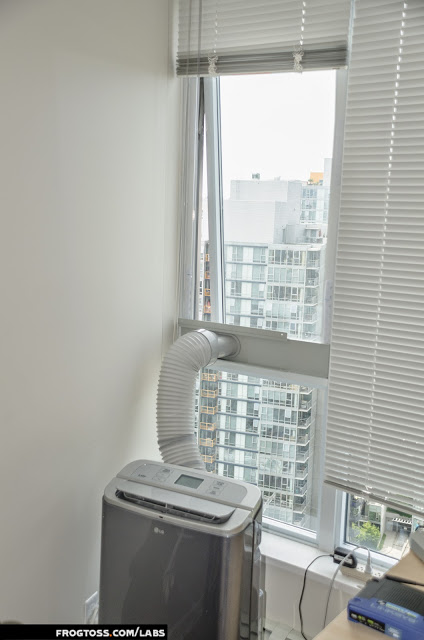
The total cost was under $40, took two hours, and has worked for me for two summers. I can remove the acrylic glass by tearing away at the Velcro in seconds, making end-of-season take down a five minute chore.
Here is what you need:
- One sheet of acrylic glass — large enough to cover the entire open window.
- Industrial Velcro to run up the sides of the window. The wider, the better. More on this later.
- A circular saw to cut the acrylic glass, or if you’re like me and don’t have a workbench, a scouring knife and some personal tenacity.
- A floor AC unit. Window mounted ones will not work, as they need to hang out too far and will interfere with your barely-opening window.
Step One
Mount the plastic exhaust panel on your window. Your AC panel instructions will tell you to screw it into the wall. This is intractable — we want to avoid damaging our windows by drilling into metal. Instead, throw down a few inches of that sweet, sweet Velcro and the exhaust panel stays in place:

Step Two
Measure your window and cut the acrylic glass to fit.
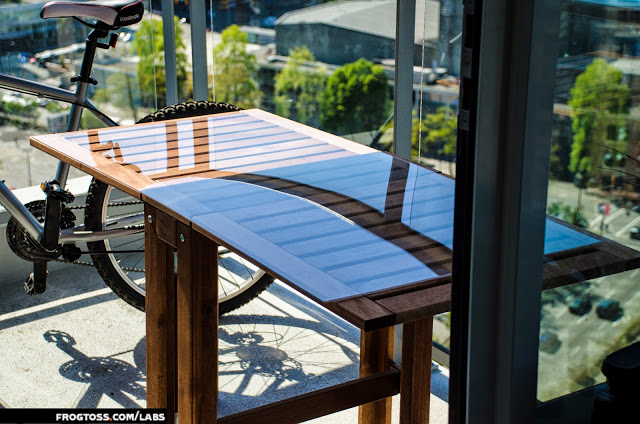
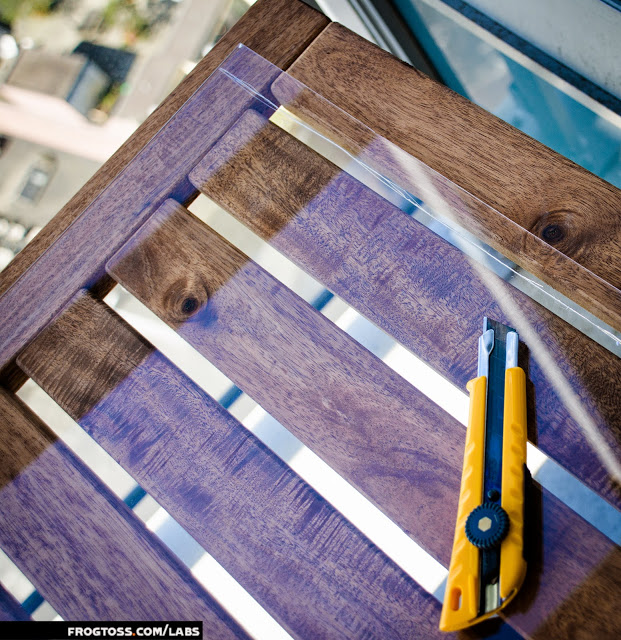
Unfortunately, I didn’t have a workbench, and didn’t feel like making my way to the ‘burbs to use one, so I used a table on my deck. I scoured the glass with a scouring knife and filed the edges down. This was not easy, and I was punished for my laziness and impatience by grinding away for almost an hour.
The glass:
The scouring:
Step Three
Now that your acrylic glass is cut to fit and filed down for smoothness, attach Velcro to the edges and mount it in the window. You want it to fit in so that it is overlapping the metal frame on the top and sides, with the bottom seating directly into the AC exhaust mount.
Here’s a closeup of Velcro mounted to the metal window edge:

Bonus Tips
At this point, you can fire up the AC and breathe again, but you should keep these tips in mind:
- If you have a wide enough window, consider getting an AC unit that draws its air from outside instead of from in your house. AC units with two pipes are always going to produce a colder room than one. Otherwise, you are drawing warm air from the rest of your apartment when your AC creates a vacuum by expelling the hot air you are aiming to remove from your room.
- You want your Velcro to be as wide as possible. When the sun hits the metal frame, it heats up and some of the glue will melt. If you’ve done your job, you should have a very firm and sturdy acrylic frame, but after a couple of years, the glue will be tired and you will need to replace the Velcro.
- Seriously, scouring acrylic with a knife is a pain. Get a table saw.